Change To In Background How Zoom
Download the zoom mac or home windows app.. open the application, register, click your profile image, observed with the aid of the settings link in the drop-down menu. navigate to the virtual history tab. Alternate your zoom background on the computer app 1. in the zoom app, click on your profile in the pinnacle right corner, and click on settings. 2. on the menu to the left, click digital heritage. 3. you will. Zoom helps you to alternate backgrounds to a handful that come with the app, or any picture you upload. people are becoming innovative, designing all forms of zoom backgrounds and putting them change to in background how zoom on line without spending a dime. To configure your zoom history, log into the computer application and click on at the settings icon in the top proper corner. underneath the digital history tab, you could select from stock alternatives, or.
It’s known as virtual heritage and it could replace your webcam’s heritage, without needing a inexperienced screen setup. here’s how to installation zoom’s digital historical past function first, you need to. To configure your zoom historical past, log into the laptop software and click on on the settings icon inside the pinnacle right corner. under the digital heritage tab, you can select from inventory alternatives, or. Zoom lets you exchange the historical past so you can hide the messy room behind you or upload some privateness if you don't want people to see your own home. right here's the way to do it. Zoom offers a few default digital backgrounds, or you can upload your personal picture to trade your zoom history to something greater non-public. we rounded up some of the nice unfastened zoom backgrounds you operate.

Right Heres A Way To Alternate Your Heritage On Zoom In 8 Clean
Zoom is a software program you can use on mac or home windows, as well as a mobile app for android and ios telephones/drugs. this wikihow will train you the way to trade your background on zoom using the app on ios and the software on mac and home windows; regrettably, you can't do this if you're the use of the app on android. Right here are the stairs to change your default history and add a new heritage picture in zoom. converting your default history. open zoom to your laptop or browser and log into your account. be part of or create a brand new assembly. once in the assembly, click on the upward arrow inside the bottom left corner of the display.
The Way To Alternate Your Background In Zoom Tech Junkie


You may comply with these steps to change the historical past all through zoom video calls on your mac or laptop. step 1: open the zoom app to your mac or computer. step 2: click on at the settings cog positioned at the top-right nook and go to the digital background option inside the window that pops up. Zoom features settings that could assist with your overall appearance: the zoom digital background and touch up my appearance. right here’s a way to exchange your videoconferencing history in zoom to make it. How change to in background how zoom to show on virtual backgrounds in zoom. you ought to see digital heritage approximately halfway down at the left aspect. technology and the war towards biodiversity loss and weather exchange.
Zoom lets in you to feature digital backgrounds for your meetings. you may add pix or videos as your background. you could select from the zoom default digital backgrounds or add your very own photograph or. Converting the heritage. the zoom cell app doesn’t allow you to exchange the historical past photo. so the following suggestions will attention at the computing device app. apart from this difficulty, the complete technique is notable honest. step 1. release the laptop app and click on on the equipment icon beneath your avatar to get entry to the settings menu.
In case you're already in a assembly, you could change your historical past with the aid of clicking the up arrow (^) next to "start/forestall video" and selecting "select a digital history. " you'll see the same "virtual backgrounds" field look like the previous steps. [1]. To help us all out, "desirable morning the usa" has created a step-by means of-step on the way to change your history and navigate a number of the key zoom gear. a way to alternate your history. 1. first, make certain you "permit" digital backgrounds with the aid of going to "settings" at zoom. us in a web browser 2. as soon as enabled, open zoom to your computer or browser 3. Open the zoom app on your pc. faucet the settings icon at the top proper. pick digital background on the left menu. you will see a few pre-loaded zoom backgrounds. pick the one you want. Change the default history picture. follow these steps in case you need to exchange the default heritage photo for all zoom rooms for your account. log in to the zoom internet portal. click on room management > zoom rooms. click account settings on the pinnacle of the web page. within the account profile tab, underneath historical past photo for zoom rooms, click on upload new photo.
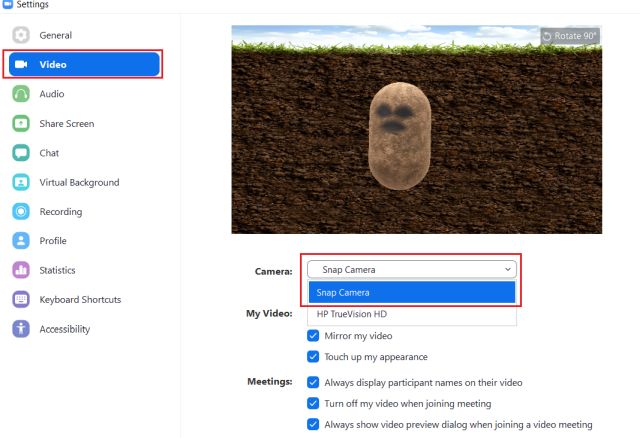
Register to the zoom laptop purchaser. ; click on your profile picture then click settings. ; pick change to in background how zoom virtual history. note: if you do not have the digital historical past tab and you've got enabled it on the web portal, signal out of the zoom computing device client and sign up once more. test i've a green screen when you have a physical inexperienced display installation. you may then click on on your video to choose the suitable shade. Zoom capabilities settings which can assist along with your standard appearance: the zoom virtual historical past and contact up my look. right here’s a way to change your videoconferencing background in zoom to make it.
To try this while you’re on a zoom name, click the up arrow next to “forestall video. ” in the menu that appears, click on “choose digital history. ” this takes you to the “digital background” tab inside the “settings” menu. right here, you’ll see some historical past movies (those with a video digital camera icon at the lowest left) and photos you can. See greater videos for how to alternate history in zoom.
Right here’s the way to use zoom’s digital heritage characteristic: join a assembly, then click the greater tab even as you're logged into your account. faucet the digital history alternative. pick out a background from the furnished library or. To allow the digital background function for all participants of a selected organization: register to the zoom internet portal as an administrator with permission to edit person agencies. click on group management. click the call of the organization, then click the settings tab. navigate to the digital history option on the. Even higher than converting your zoom historical past: trade your face in video chats. those free, addicting video change to in background how zoom chat filters can provide you with an extended beard, devil horns or an egg for a head. 1. inside the zoom app, click on your profile in the top right nook, and click on settings. 2. at the menu to the left, click on digital history. 3. you may see some default historical past alternatives furnished by means of zoom, consisting of an outer area scene or blades of grass. you 4. in case you want to upload a picture to.
To that end, in case you’re concerned approximately privateness or just don’t want the mess inside the background to expose up for the duration of a video assembly, you could disguise it through including a heritage for your live video. here’s how you may trade the zoom video history. The way to alternate your zoom history at the mobile app down load the zoom app for ios for your iphone or ipad open the app, register and be part of a meeting. tap the three dots at the bottom right to open the more menu. tap virtual heritage. select one in every of zoom's defaults or upload your very own. How to alternate your background on zoom. you can disguise your background during video calls on zoom. this placing replaces your actual background with a video or photograph. to try this when you’re on a zoom name, click the up arrow next to “forestall video. ” within the menu that looks, click “pick virtual background. ” this takes you to the “digital history” tab in the “settings” menu.


Komentar
Posting Komentar